Writing a report and supporting its conclusions
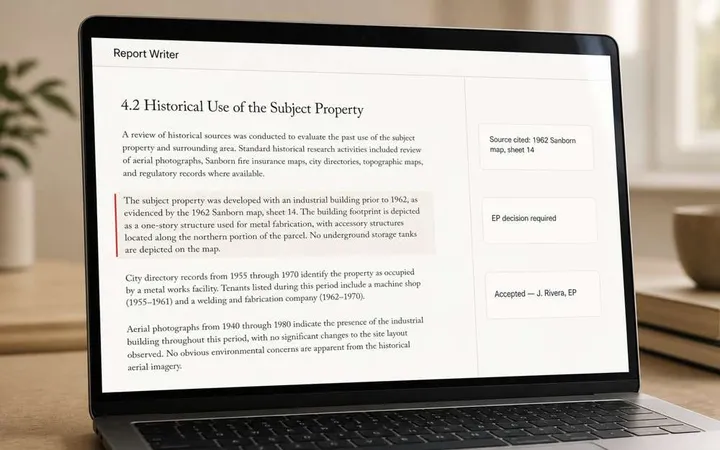
A well-written paragraph is useful. It can still leave the reviewer with important work: checking the source, deciding whether it applies to the subject property, evaluating conflicting information, and determining what the evidence supports.
A citation helps locate a record. It does not, by itself, establish that a conclusion follows from that record. An explanation also needs to withstand review. The EP needs access to the evidence and the presented rationale, with room to approve, edit, or amend the conclusion.
Our traceability guide for AI-assisted Phase I ESAs explains the evidence trail. Here, the focus is the buying decision: how that review actually fits into your team’s daily reporting work.
- 01Project evidenceRecords, observations, and research materials
- 02Domain-informed analysisInterpret the information in its environmental context
- 03EP reviewCheck evidence and rationale; approve, edit, or amend
- 04Your firm’s reportReviewed language and professional conclusions
The review can send the work back for more information or a revised conclusion.
What changes when environmental expertise shapes the workflow
Both approaches can produce fluent text. The difference is what guides the interpretation, and how much of the reporting process your firm has to build and maintain itself.
General chat workflow
Your firm assembles the reporting process
A chat interface can be useful for drafting and revising text. The result depends on the context, instructions, tools, and controls your team puts around it.
- Determine which project records and specialist guidance the workflow uses.
- Decide how sources, uncertainty, and review decisions stay connected to the draft.
- Check how approved language moves into the report and how the process is maintained across staff and projects.
Assess your actual setup, including any custom integrations or specialist configuration.
FlipType workflow
Environmental reporting shapes the application
FlipType’s proprietary environmental expertise, developed over years, guides how project information is interpreted and analyzed, so drafting does not rest on general AI knowledge alone.
- Work through a Phase I report-writing process built for environmental professionals.
- Review draft language alongside source references and the presented basis for conclusions.
- Approve, edit, or amend conclusions using your professional judgment before finalizing the report.
Inspect the application in a demo and confirm the workflow against your firm’s requirements.
General AI can be configured with specialist information and review controls; a purpose-built label alone does not establish quality. These are workflow considerations, not a head-to-head performance test, and either approach can produce errors. OpenAI’s accuracy guidance emphasizes relevant context and evaluation; Anthropic’s guidance recommends checking claims against sources and notes that safeguards do not eliminate hallucinations.
A practical example: what does the record support?
Consider a fictional project file where a prior report notes an old incident as closed, but the underlying closure letter is missing. A draft might summarize the report correctly and still overstate what that status establishes for the property.
Fictional review example
The information available
A prior report references an incident with a closed status. Supporting closure documentation is not in the supplied file.
The question for the EP
What was closed, on what basis, and what information is needed to evaluate its significance for this assessment?
Inspect the source. Examine the draft’s interpretation. Identify what remains unresolved. Then approve, edit, amend, or seek more information.
The point is not to assign a classification from this short example. Missing documentation does not automatically establish a REC, and not every missing item is a significant data gap. For timing, closure-evidence questions, and reporting context, see our ASTM E1527-21 review guide. For the wider assessment process, start with the Phase I ESA guide.
Five checkpoints for your next software demo
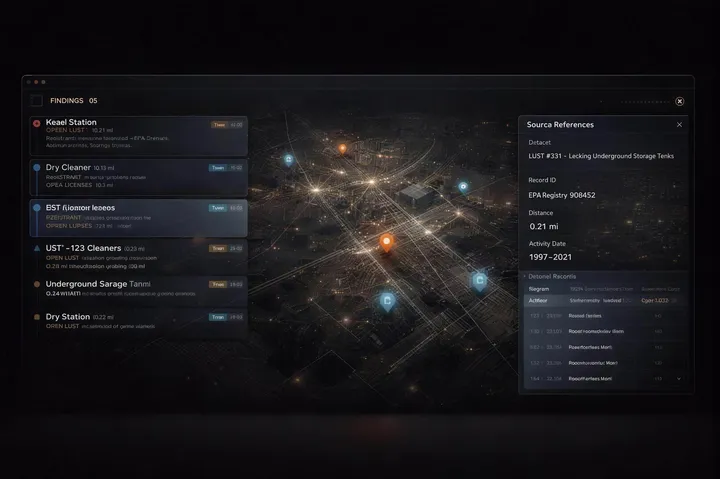
- Open the supporting evidence. Choose a statement and ask to see the underlying record. Check that it supports the statement in context.
- Examine the basis for the conclusion. Ask what information the interpretation depends on and what assumptions or limitations need attention.
- Follow an unresolved question. Ask how missing or conflicting information is presented to the reviewer. The EP determines its significance.
- Watch the EP change the draft. Inspect how the reviewer approves, edits, or amends a conclusion and how the resulting language reaches the report.
- Check the handoff to your firm. Discuss your template, review responsibilities, relevant dates, onboarding, and data-handling requirements.
Use these checkpoints alongside the nine-question software evaluation guide. If you are comparing the wider mix of data providers, screening tools, report platforms, and drafting software, the Phase I ESA software stack guide separates those roles.
Choose the reporting workflow your team can use
A general AI setup may fit a firm that wants to design and maintain its own reporting process. A purpose-built application may fit a firm looking for an established environmental reporting workflow. In either case, inspect the process rather than relying on the fluency of a sample paragraph.
FlipType’s AI Phase I ESA Report Writer brings domain-informed interpretation and professional review into the report-writing workflow. The EP remains responsible for reviewing the evidence and the presented rationale, and for approving, editing, or amending the conclusions. The demo is your opportunity to see that work happen.