
Start with the signature, not the demo
Every AI Phase I ESA tool demos well. A clean draft of Section 4.2 appears on screen in seconds, the room nods, and the question of whether an Environmental Professional could defend that paragraph under a lender's review six months later never comes up.
It should be the first question. Under ASTM E1527-21 the EP signs, and the EP is responsible for every REC, HREC and CREC determination, every data gap, and every conclusion. An AI report writer is worth buying if it makes that responsibility easier to carry, and worth avoiding if it hides the reasoning the EP will be asked to explain. The nine questions below are the ones we'd want answered before putting any tool, ours included, in front of a firm's EPs.
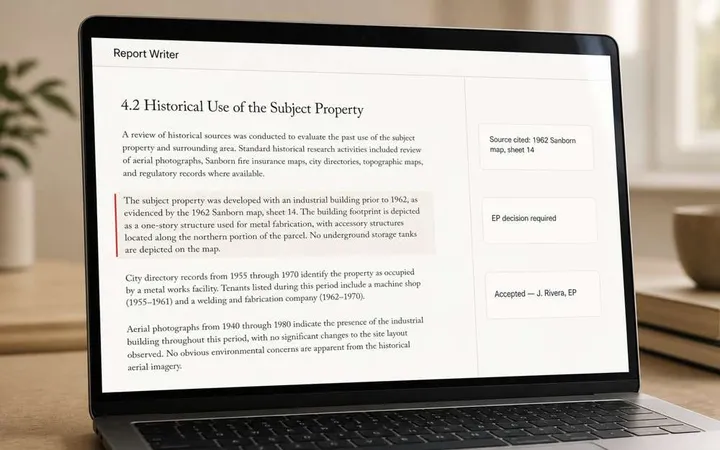
1. Can the EP see the source and the reasoning for every statement?
This is the whole game. Ask to click on a sentence in a drafted section and see where it came from and why the tool wrote it. If the answer is a general "the model read your documents," that is a chat window with a nicer interface.
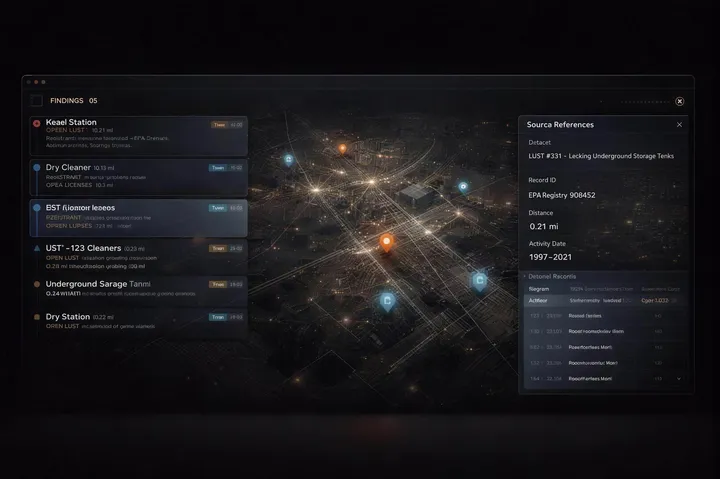
A defensible tool shows, per output, the source it drew on and how it reached the conclusion, so a reviewer can confirm or overrule it in seconds rather than re-reading the underlying record. We set out the full standard in Defensible AI for Phase I ESAs: the traceability standard.
FlipType: every AI output carries a citation to its source and an explanation of how the analysis was performed and why it reached that conclusion.
2. What does it work from?
Ask what the tool needs from you to produce a draft, and whether those are things your firm already has. The materials that carry an EP's judgment are the firm's own: previous reports for the region and property type, research notes, field reports and site observations. A tool that works from those is working from the same evidence the EP would.
FlipType: the EP works from the firm's own previous reports, research notes and field reports.
3. Where does the EP's review happen?
There are two models. In a draft service, you send inputs and receive a document to edit elsewhere. In an in-app model, the EP builds and reviews the report inside the tool, and the export is the last step. Neither is wrong, but they suit different firms: the first for occasional use, the second for teams producing reports every week, where the review trail itself becomes part of the QA/QC record.
FlipType: the EP builds the full Phase I inside the application.
4. Does the output land in your template?
A report that has to be re-formatted into the firm's Word template is a report that gets edited twice. Ask whether the export uses your template — headers, section numbering, boilerplate, signature block — or the vendor's.
FlipType: on completion the report downloads as a Word document in the firm's own template, and the EP signs off as always.
5. Does it cover the report the way E1527-21 structures it?
Some tools draft a narrative summary and call it a Phase I. Ask which sections the tool produces, and specifically how it handles the parts a reviewer reads first: the REC, HREC and CREC findings, the de minimis conditions, the significant data gaps, and the 180-day components. If the tool can't tell the difference between an HREC and a CREC, the EP will be correcting it on every report; the distinctions are in our ASTM E1527-21 guide.
FlipType: structured drafts for each standard section of the report.
6. What happens when it isn't sure?
The quiet failure in AI-drafted Phase Is is not the wrong statement but the invented one: a gap in the records smoothed over with confident prose. Ask what the tool does when there is no record to support a statement. The right answer is that it writes nothing, so the absence is visible to the EP, rather than producing plausible text the EP then has to catch.
FlipType: the tool only writes what it can cite. If there is no record behind a statement, the statement isn't produced — a silence in the draft tells the EP the record wasn't there, not that the tool guessed.
7. Where does client data live, and who else can see it?
Phase I files contain client, property and transaction detail. Ask three things: is each firm's data isolated from every other customer's, where is it hosted, and how is access controlled. Then have your IT lead ask the same questions in their own words.
FlipType: each firm's data lives in its own isolated tenant on Microsoft Azure, with Microsoft identity handling sign-in; FlipType is a member of Microsoft's startup program.
8. How does the pricing model match your volume?
Per-draft pricing suits firms with irregular Phase I demand. Subscription pricing suits firms with steady volume, where the per-report cost falls as output rises. Work out your monthly Phase I count for the last year and price both models against it before a demo, so the demo is about the product rather than the invoice. The wider software landscape, and which category of tool fits which volume, is in our 2026 Phase I ESA software stack guide.
FlipType: ask us for current software pricing and compare the quoted scope with your firm's volume, review effort, and template requirements. Confirm the commercial terms before deciding.
9. Who is going to use it, and have they been trained?
The tool is the smaller change. The larger one is a team of EPs and junior staff working in a new way, with new review habits. Ask the vendor what onboarding looks like and who inside the firm owns adoption. If the answer is "it's intuitive," plan your own rollout; the firms that get value fastest treat this as a workflow change, which is the reason AI training for environmental firms exists as a separate practice.
FlipType: yes — we train teams, help establish AI governance, and identify the workflows to change first.
The one-page scorecard
| Question | What "good" looks like | Weight |
|---|---|---|
| Source and reasoning per statement | Click any sentence, see the source and the why | Essential |
| Works from your own materials | Prior reports, research notes, field reports | Essential |
| Where review happens | In-app for weekly volume; draft service for occasional use | Fit |
| Your template | Export in the firm's Word template | Essential |
| E1527-21 structure | Every standard section; REC/HREC/CREC, data gaps, 180-day components handled | Essential |
| Uncertainty surfaced | Gaps and unresolved items visible at review | Essential |
| Data isolation and hosting | Per-firm isolation; named cloud; IT sign-off | Essential |
| Pricing vs. volume | Modelled against your last 12 months | Fit |
| Adoption plan | Named owner, training, review habits | Fit |
Score a tool "Essential" on every essential row before the "Fit" rows matter at all.
Use the demo to check your own workflow
Turn the scorecard into a short evaluation you can repeat across vendors. Before sharing project files, confirm that you have permission to use them and agree how they will be handled.
- Follow one statement back to its source. Ask the presenter to show the record behind a draft sentence and identify anything the EP still needs to resolve.
- Test a missing or conflicting input. Check whether the gap stays visible for professional review instead of disappearing into confident prose.
- Review the handoff. Ask where your EP edits the draft, how decisions are captured, and what reaches your firm's Word template.
- Confirm fit and costs. Discuss your project locations, source records, annual report volume, onboarding, and the commercial terms before committing.
Start with FlipType's illustrative draft excerpt with fictional site records. Then review the pricing and project-fit questions or book a 30-minute Report Writer demo to inspect the workflow live. A sample is not evidence that every project or record format is supported; confirm your requirements in the conversation.