
Five jobs, one workflow
Three years ago "Phase I software" meant a data package and a Word template. In 2026 the tools have specialised into five jobs, and most firms run several of them side by side:
- Environmental data — the regulatory database search, historical sources and radius maps the EP's records review depends on.
- Desktop screening — fast constraint and risk screens before, or alongside, a full Phase I.
- Report assembly and management — templates, brand standards, QA/QC workflow, project tracking.
- AI drafting — tools that write the report sections from the firm's own materials, with the EP reviewing and signing.
- Templates and checklists — the free resources that solo EPs and small shops run on.
None of these replaces another. Screening still happens before the site visit; the EP still signs. What has changed is how much of the writing itself can be accelerated. The table sorts the tools by job, and each section describes what the vendor offers.
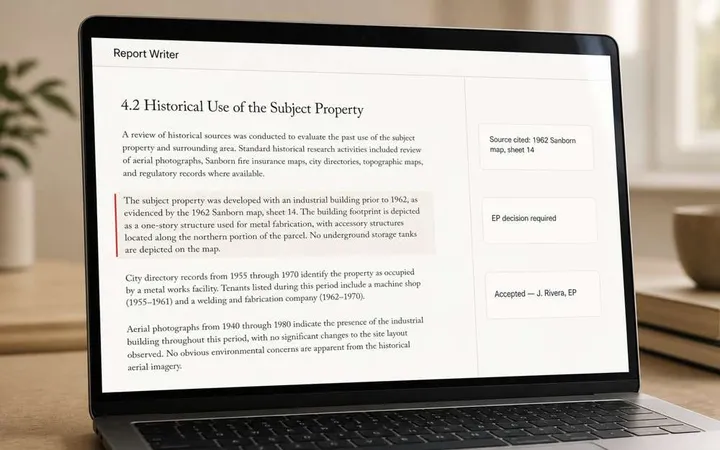
If report drafting is your bottleneck: FlipType’s AI Phase I ESA report-writing software turns project materials into a source-backed draft for Environmental Professional review. View an illustrative draft excerpt or book a report-writer demo to see the workflow.
At a glance
| Tool | Role in the workflow | What it does | Typically used by | AI in the product | How you pay |
|---|---|---|---|---|---|
| LightBox EDR | Environmental data; with the EDR PARCEL Platform, report assembly and project management | Regulatory database reports, historical sources and radius maps; PARCEL adds branded report assembly and project tracking | Firms of every size producing Phase Is | See vendor | Per-report data packages; platform subscription |
| Transect | Desktop screening | Automated environmental constraint and permitting screens; a marketplace Phase 1 ESA product | Developers, land teams, consultants scoping early | Automated screening; see vendor | Subscription; marketplace à la carte |
| Quire | Report assembly and management | Template-driven technical report platform across 80 report types; benchmarking; AI Search and Lazarus (2026) for querying a firm's report library | Mid-size to high-volume firms producing many report types | Yes — search and chat across a firm's reports | Subscription |
| Atlas AI | AI drafting | Cited first-pass Phase I drafts with a second AI verification pass | Firms that want a draft service per report | Yes — drafting with citations | From $500 per draft |
| FlipType | AI drafting | The EP builds the full Phase I in the app from the firm's own materials; source references support draft review; exports to the firm's own Word template | Environmental teams evaluating AI-assisted report drafting | Yes — section drafting with source-level traceability | Request current software pricing, including any onboarding costs |
| A3 Environmental | Templates and checklists | Free field checklist, user questionnaire and report example; freelance EP network | Solo EPs and small shops | No | Free |
Descriptions summarize each vendor's own published materials as of September 2026 and are provided for orientation only; capabilities and pricing change, so confirm details with the vendor. All product names and trademarks belong to their respective owners. FlipType is independent of, and has no commercial relationship with, any of the other companies listed.
LightBox EDR: the environmental data layer
Regulatory database reports, historical sources and radius maps; the EDR PARCEL Platform adds automated report writing with project management.
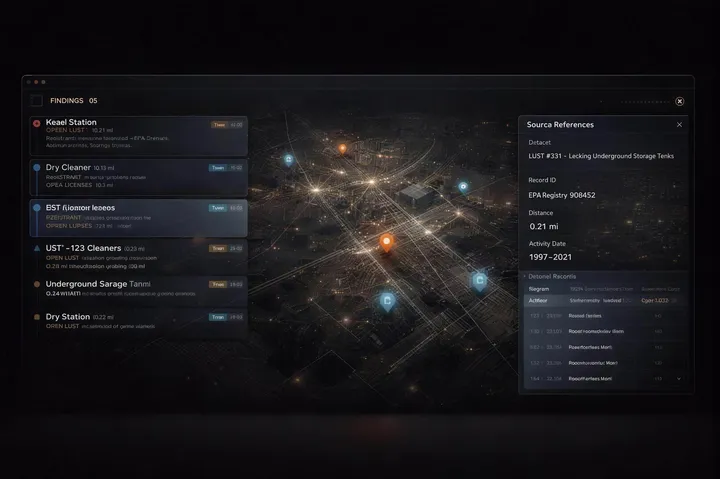
Nearly every Phase I starts with an environmental data package, and LightBox's EDR is the long-established source for that work: regulatory database reports, historical aerials, fire insurance maps and city directories that support the records review E1527-21 asks of the EP.
LightBox also offers the EDR PARCEL Platform, which it describes as automated report writing with project management: field data and photos come in from the EDR mobile app, reports follow the firm's brand standards, and managers see every project from bid through QA/QC and sign-off. LightBox cites a 41% reduction in administrative time from automated setup and task assignment, and has written that AI should "assist EPs rather than replace them."
Transect: screening before the Phase I
Automated desktop constraint screens for a parcel, producing a report with an executive summary and a permitting matrix in minutes.
Transect solves a different problem: the desktop constraint screen. It pulls critical habitat, species occurrences, soils, geology, wetlands and EPA-registered facilities for a parcel and produces a report with an executive summary and a permitting matrix in minutes. Its core users are developers, land teams and the consultants who scope for them, particularly when working in an unfamiliar state.
Transect also offers a Phase 1 ESA that can be ordered from its marketplace or added to an existing project; scope, turnaround and how EP review is handled are described by Transect directly.
Fits: early-stage screening and go/no-go decisions.
Quire: the technical report platform, now with AI search
A template-driven Technical Report Management platform, with AI Search and Lazarus for searching and reusing a firm’s report library.
Quire is the most established report platform in the space: a template-driven system it describes as Technical Report Management, with 1.5 million reports across 80 report types and more than 8,000 templates behind it. Its benchmarking data lets firms compare turnaround and cost against the industry, and the Bureau Veritas deployment remains the reference case for standardising a large, distributed team.
In February 2026 Quire added Quire AI Search — natural-language search and chat across a firm's report library, with multi-report analysis and content reuse — and Lazarus, which migrates legacy reports into the same searchable library. Quire cites up to 70% time savings on precedent searches. Quire's own framing is "we transformed how technical reports are created; now we're transforming how they're used."
Fits: mid-size to high-volume firms that produce many report types and want one system for templates, QA/QC and institutional memory. Quire positions its AI features around finding and reusing what a firm has already written; section drafting is a different step in the workflow, which is where the AI drafting tools below sit.
Atlas AI: cited drafts, priced per report
A cited first-pass Phase I draft in the firm’s Word template, with a second AI pass to verify it, priced per draft.
Atlas AI is the newest entrant and the most direct comparison for anyone searching "AI Phase I ESA." It generates a cited first-pass Phase I draft from the sources a firm connects to it into the firm's Word template, then runs a second AI pass to verify the draft and flag ambiguities for the EP. Pricing starts at $500 per Phase I draft, with lender screens from $299 and monitoring reports priced per site.
The model is a draft service: send the inputs, receive a draft, review and sign. That suits firms that want to try AI drafting on a handful of reports without changing how the rest of the workflow runs.
Fits: firms testing AI drafting at low volume, or with irregular Phase I demand, where per-report pricing beats a subscription.
FlipType: report drafting with source references for review
The EP builds the Phase I inside the application, reviews source references and draft language, and exports to the firm’s template.
FlipType's AI Phase I ESA Report Writer, now in its fourth version, takes the opposite approach to a draft service. The EP builds the full Phase I inside the application, working from the firm's own previous reports, research notes and field reports; the tool produces structured drafts for each section of the report.
Source references support the EP’s review of draft language. The EP checks the records and reasoning, resolves gaps, and corrects unsupported statements. When the report is complete it downloads as a Word document in the firm's own template, and the EP signs off as they always have.
Two design choices shape how it works. The first is that defensibility is the design constraint rather than a feature: the workflow exists to make the EP's review faster, not to skip it, which is the standard we set out in Defensible AI for Phase I ESAs.
The second is the deployment model: each firm's data lives in its own isolated tenant on Microsoft Azure, with Microsoft identity handling sign-in, and FlipType is a member of Microsoft's startup program. For background on the reporting workflow, see our whitepaper on AI-assisted Phase I ESAs.
To assess fit for your firm, compare the time spent preparing inputs, drafting, reviewing and correcting a report with your current process. Report volume alone does not establish a return on investment. Ask for current software pricing, including any onboarding costs, then use the workload comparison below to decide whether the workflow is worth a closer evaluation.
Fits: environmental teams looking to reduce repetitive drafting while keeping professional review and final signoff in their own workflow. Start with the illustrative draft excerpt, then bring your template and review questions to a software demo.
A3 Environmental: the freelancer's toolkit
Free resources for solo EPs: a Phase I field checklist, a user questionnaire and a sample report, plus a freelance EP network.
A3 Environmental is a consulting firm, not a software company, but its free resources are the most-used "tools" among solo EPs: a Phase I field checklist PDF with no branding on it, a smartphone-friendly version of the same checklist, a user questionnaire, and a sample Phase I report. A3 also runs a map-based network of freelance EPs and inspectors it refers work to.
Fits: independent EPs and two- or three-person shops. If you're producing one or two Phase Is a month, this plus a good Word template is a legitimate stack.
Which tools make sense for your workload
Choose the job you need to improve before choosing the pricing model. A data package, report-management platform and AI drafting tool solve different parts of the Phase I workflow. A monthly report count can help estimate usage, but it cannot tell you whether a purchase will pay for itself.
1. Establish a baseline from completed reports
Use a small set of representative projects: a straightforward site, a file with gaps or conflicting records, and a report that needed substantial revision. Record staff time separately for input preparation, drafting, Environmental Professional review, corrections and export into your template. Keep fieldwork and other assessment tasks separate if the tool does not change them.
2. Compare the full workflow if an evaluation is available
If a vendor offers an evaluation, agree on its scope and terms before starting. Use materials your firm is permitted to share. Compare the same work in the proposed workflow, including source checks, extra EP review, corrections, file preparation and template cleanup. Record whether the draft meets your review requirements before counting any time as saved. A faster first draft is not a saving if the additional review and rework consume the difference.
Inputs for your firm's software decision:
- Net staff time per report. Current preparation, drafting, review and correction time minus the same tasks in the proposed workflow. Include new tasks and separate staff roles where their costs differ.
- Reports the tool can actually support. Use eligible projects per month, allowing for seasonal demand, client restrictions and files that do not fit the workflow.
- Change in recurring cost. Ask about licenses, seats, usage limits, per-report charges and any additional services or data packages. Subtract costs the new arrangement replaces; do not count unchanged existing expenses as new costs.
- Adoption and ongoing effort. Include new setup, template work, staff training, IT review and ongoing administration. Spread one-time costs over an evaluation period your firm chooses, and avoid counting staff time again if it is already in the workflow comparison.
- What the released time is worth. Distinguish lower cash outlay from capacity for other work. Salaried staff time released is not automatically money saved or additional revenue.
3. Calculate capacity before claiming savings
Monthly hours released = eligible reports per month × measured net hours saved per report. If net time is negative, the proposed workflow takes more time. To estimate an internal capacity value, multiply hours by your firm's loaded hourly cost for each affected role, then compare that value with the change in recurring costs and the new setup and training costs allocated to the same period. Keep this estimate separate from cash savings or revenue you can actually realize.
Fill-in worksheet — use your measured inputs:
- Current hours per report, by staff role: ____
- Proposed hours per report, including preparation, drafting, review and corrections, by staff role: ____
- Net hours saved per eligible report (current minus proposed): ____
- Eligible reports per month: ____
- Net monthly hours released (net hours per report × eligible reports): ____
- Incremental monthly software, adoption and administration costs, excluding costs already counted above: ____
A measured time reduction creates capacity. Whether that capacity reduces cash costs or supports additional work is a separate business question. Keep the review-quality result beside the hours calculation so a faster but less usable draft does not look like a better outcome.
4. Use the result to choose the next step
If the additional recurring cost or adoption effort outweighs the benefit you measured, improve the current template or workflow before committing to new software. If drafting is the bottleneck and the evaluation meets your quality requirements, compare a per-report arrangement with a subscription using actual vendor quotes and your expected usage. When coordination or template consistency is the bottleneck, evaluate report-management capabilities separately.
For a closer look at AI drafting, inspect FlipType's illustrative draft excerpt and use the demo evaluation checklist to test source review and missing information. Bring your project types, reporting template and questions about pricing and workflow fit to the discussion.
Whatever the tool, the EP's responsibilities under ASTM E1527-21 — the REC, HREC and CREC determinations, the data gaps, the 180-day components — do not move. Software changes how fast you get to a defensible draft, not who is responsible for it.